Case Study

Mira AI Stylist

An AI stylist for the clothes you already own. It reads your weather, calendar and closet, then hands you one look for today.
Timeline
10 week sprint, 2023 · revisited 2026
Team
Alina Mao, Jingxuan Hu, Kankan Liu
My Role
UI Lead · Visual System · AIGC Imagery
Tools
Figma, Midjourney
View MUSE award ↗ MUSE Design Awards 2026 · Silver
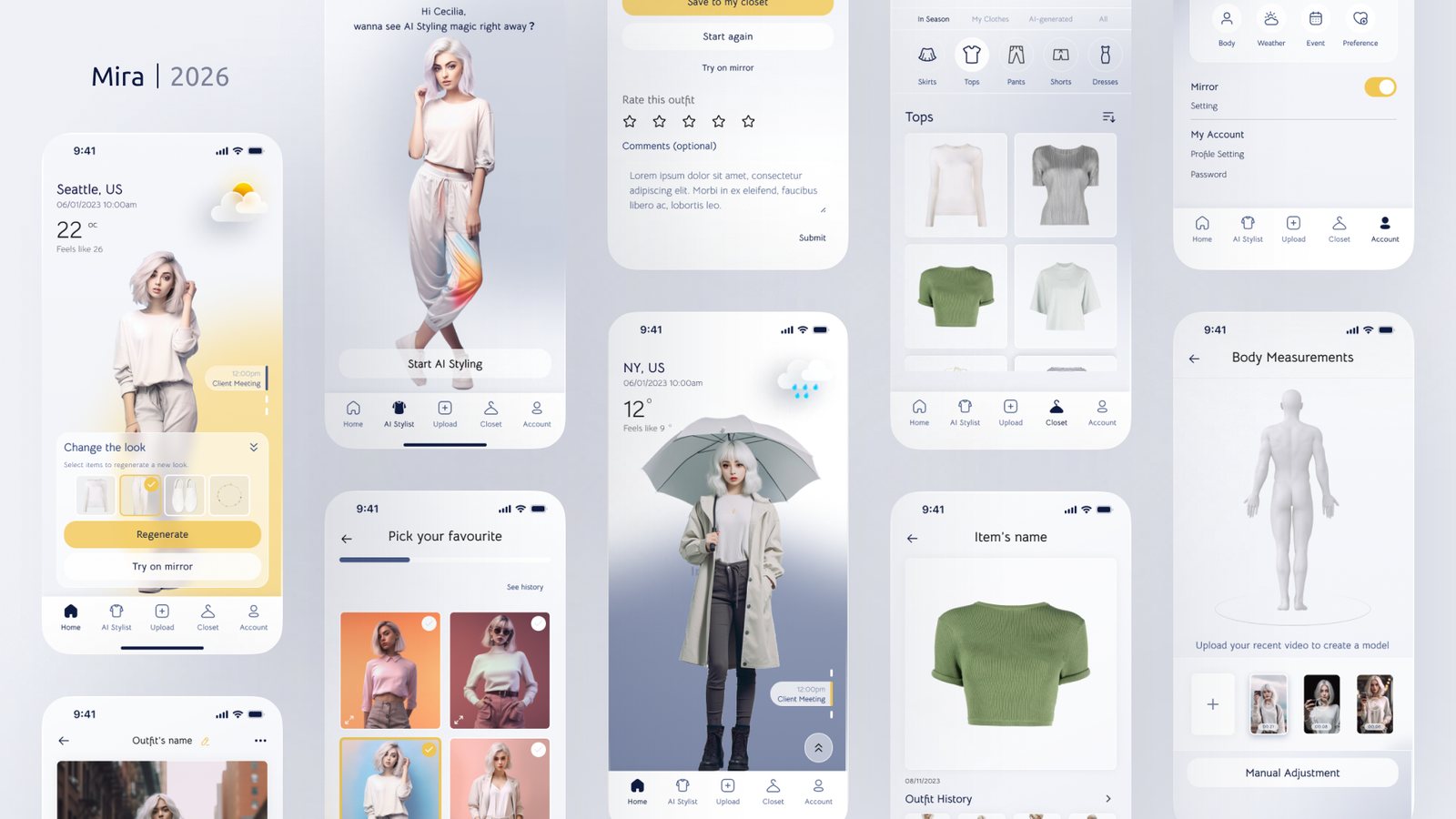
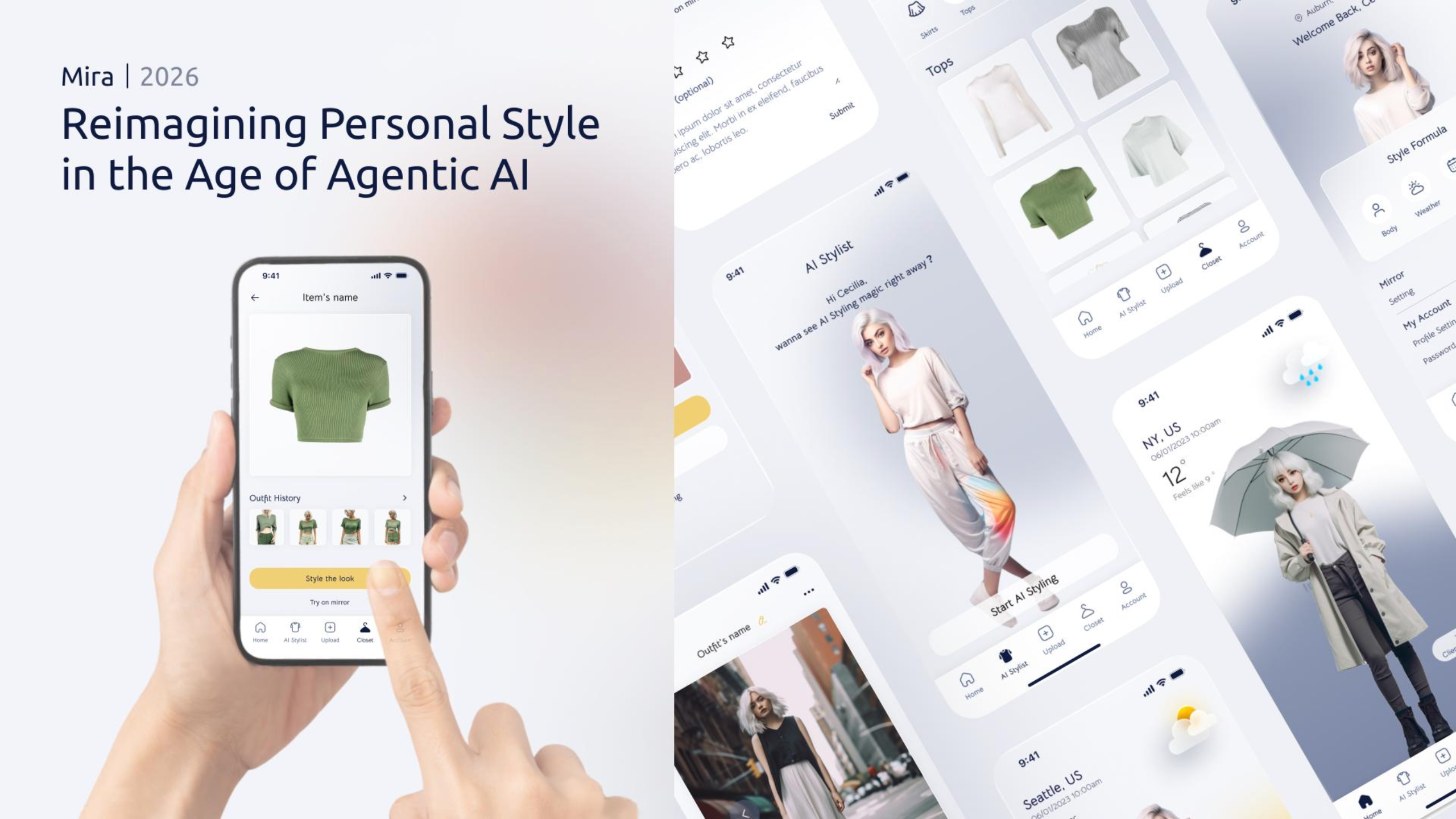
Mira cover: a hand holds a phone showing a green top and its outfit history, next to a spread of app screens for the AI stylist, the closet and weather based looks.
Mira 2026. The award entry cover. Every model and outfit was generated, then art directed by hand.
Introduction

Getting dressed is a tiny decision you make every single morning.

Mira started in 2023 with one question: could generative AI help people get more out of the clothes already in their closet? Not buy more. Wear better. Most styling apps showed inspiration from strangers with different bodies and different weather. Mira starts from your day instead.

58 survey responses on how people pick what to wear
9 interviews, ages 21 to 35
4 → 10 key flows and features, from the research
Silver at MUSE Design Awards 2026, Product Design: UX / UI / IxD
My Role

Three designers, one brief. I owned how it looks.

We ran research, flows and testing together as a team. The visual side was mine.

01

Built the visual system

Color, type and the frosted card style, tuned so the outfit is always the loudest thing on screen.

02

Directed the AI imagery

AI images drift between generations. I kept one character consistent across every screen so the app reads as one person's day.

03

Told the story

Designed the presentation deck, this case study and the 2026 award entry.

Process

Ten weeks, from survey to high fidelity.

Research first, pixels last. Each step fed the next one.

Discover

Survey, interviews, competitors

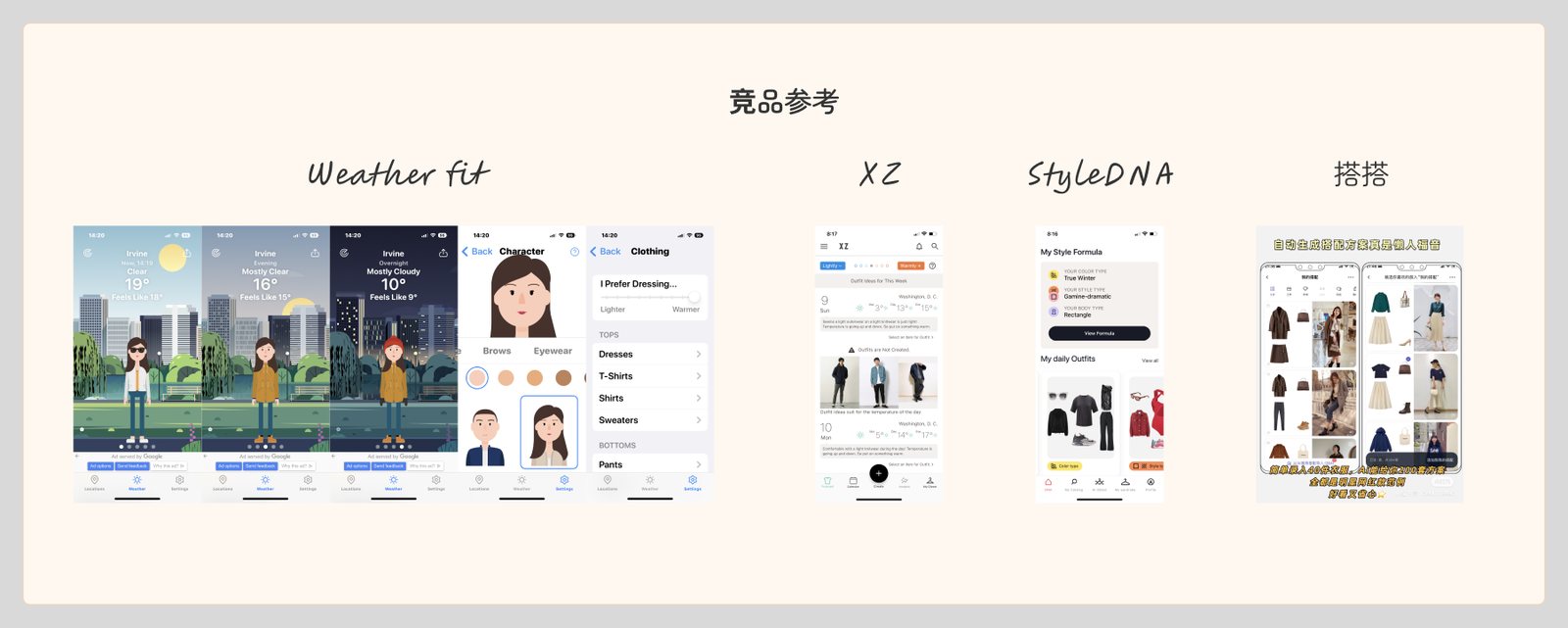
58 survey responses, 9 interviews, and a teardown of Weather Fit, XZ, StyleDNA and Dada (搭搭).

Define

Personas and journey maps

Two personas and two journey maps: getting dressed for a normal day, and packing for a trip.

Ideate

Features roadmap and IA

4 key flows and 10 features, mapped into an information architecture for the whole app.

Design

Wireframes, then high fidelity

Low fidelity flows first, then five rounds on the home screen until it worked.

Validate

Usability tests

Tested with 5 people. Card and mood board layouts beat list layouts.

Research

Most people care about their outfits. Few have time to.

37 of 58 people, 63.8%, rated how much they care about outfits above 6 out of 10. The same people told us mornings are rushed, the forecast doesn't match how warm they actually feel, and work events raise the stakes.
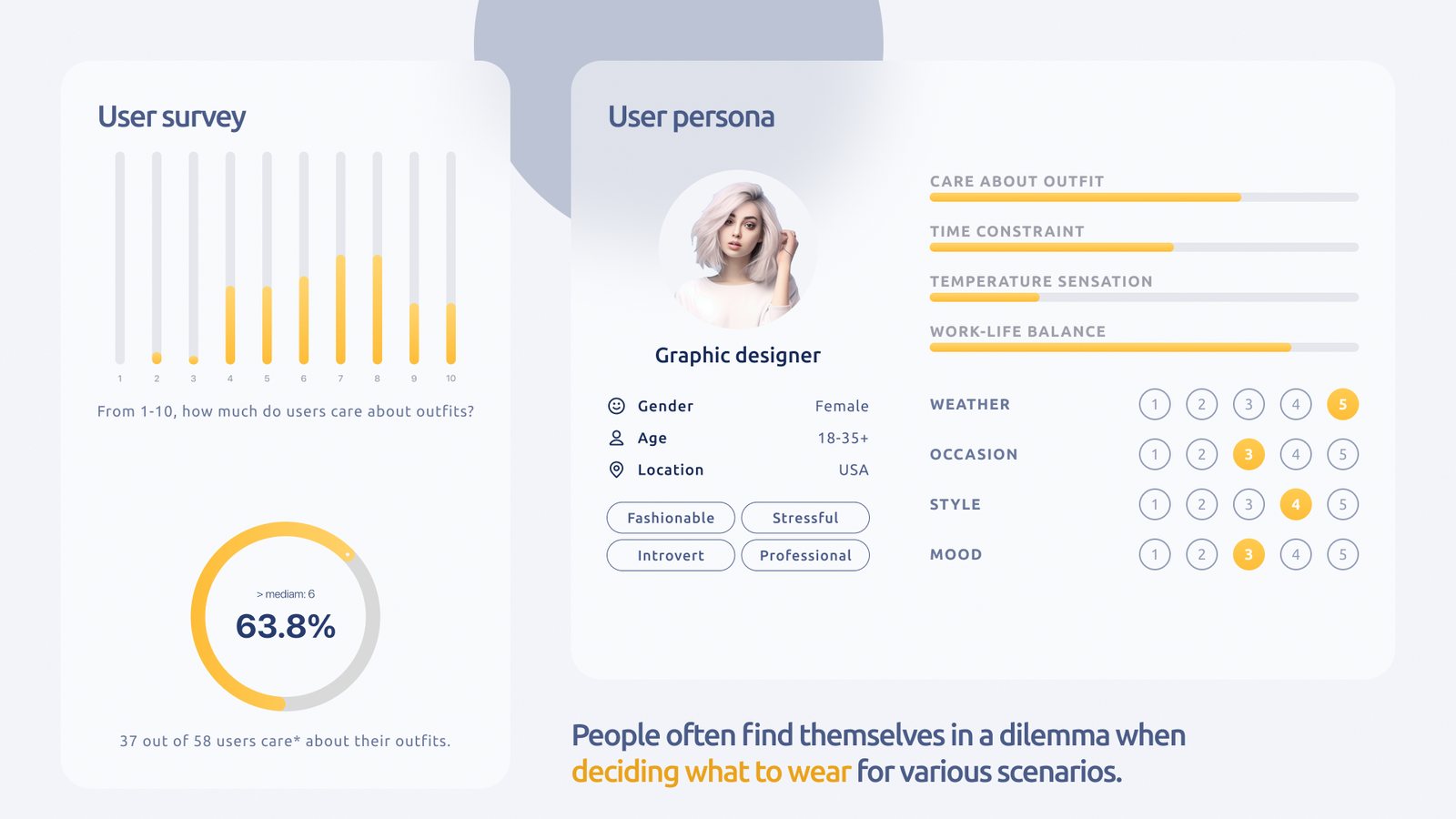
Research slide: a bar chart of how much 58 survey respondents care about outfits on a 1 to 10 scale, a ring showing 63.8 percent above the median, and a persona card for a graphic designer with ratings for time constraint, temperature sensation, weather, occasion, style and mood.
Survey and persona. How much people care about outfits, on a 1 to 10 scale.
Competitor screenshots from Weather Fit, XZ, StyleDNA and Dada, four outfit and weather apps.
Competitors. Weather Fit, XZ, StyleDNA and Dada (搭搭).
The gap

None of them fit the outfit to the person: body shape, how warm or cold they run, or the fabrics they avoid.

The Challenge

Nobody said they hated fashion. They hated the clock.

A fashion design student, an interior designer, a marketing manager, an executive director. Even the people who loved picking clothes described the same squeeze.

01

Weather uncertainty

A forecast doesn't tell you what 12°C feels like on your commute.

02

Decision fatigue

Busy mornings leave no time to try things on, then change again.

03

Special occasions

Work, formal events and anything that ends up in photos raise the stakes.

04

Repetitive outfits

People lose track of what they wore, so the same few looks come back.

05

Lack of confidence

Online inspiration rarely matches your body, so you can't tell if it will work.

06

No style feedback

Nothing remembers what you liked, so every morning starts from zero.

Persona and Journey

Meet Cecilia, who has nothing to wear in a full closet.

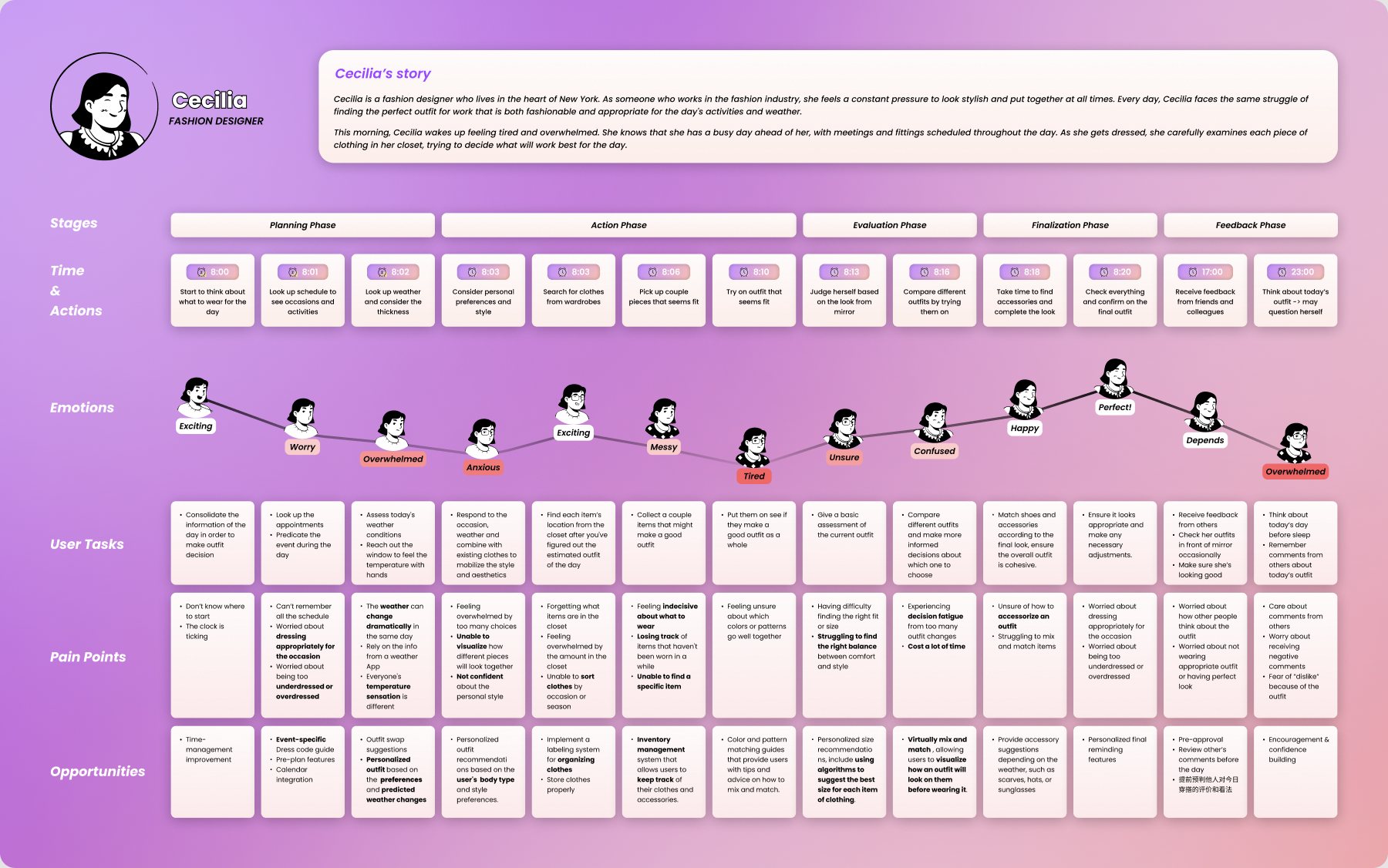
Cecilia is a fashion designer in New York. She has meetings and fittings all day, and she feels judged on every outfit. We mapped her morning minute by minute, from 8:00 when she starts thinking about clothes to 23:00 when she is still second guessing them.
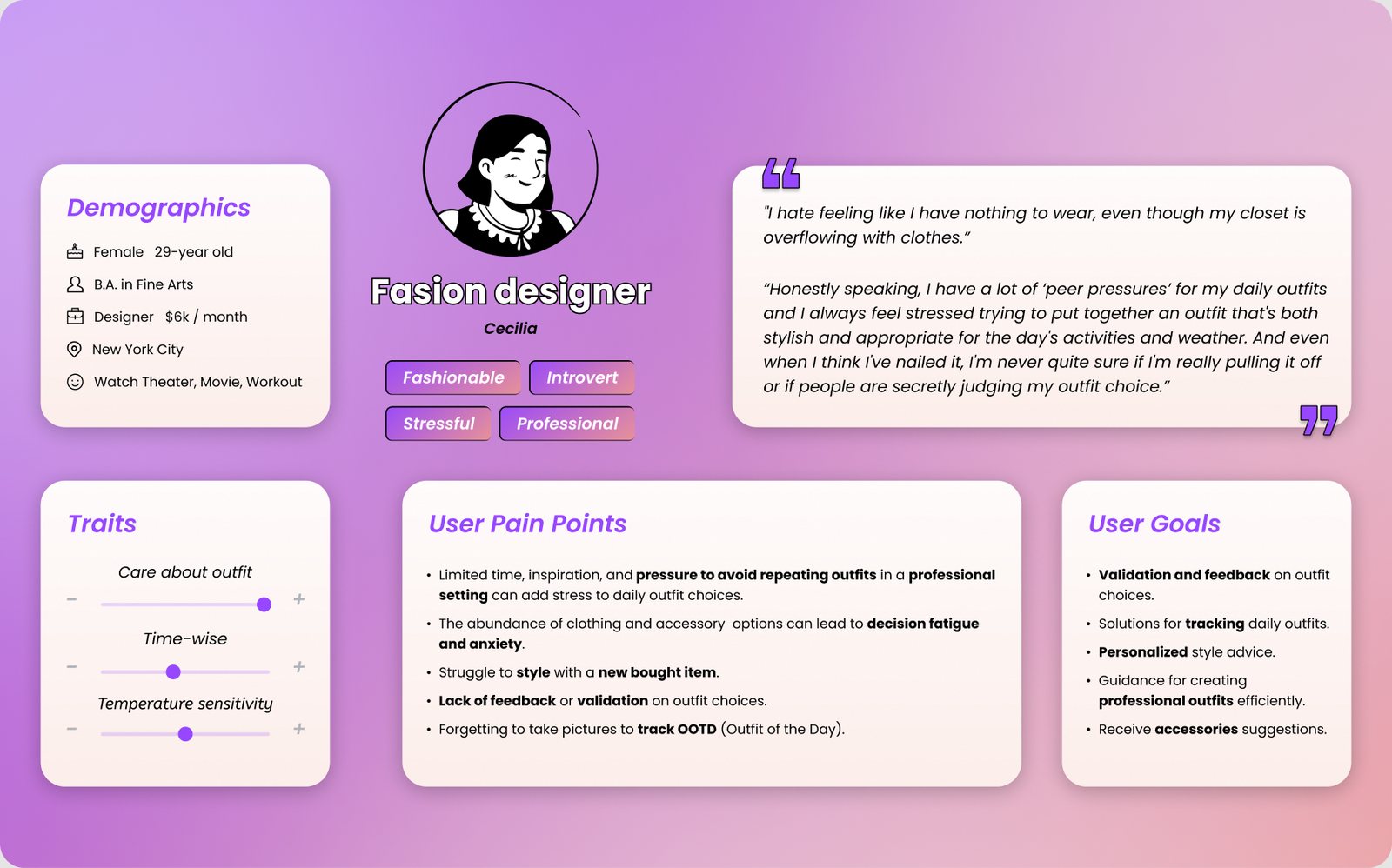
Persona card for Cecilia, a 29 year old fashion designer in New York City, with traits, pain points such as pressure to avoid repeating outfits, and goals such as feedback and tracking daily outfits.
Persona. Cecilia, 29, fashion designer, New York.
User journey map for Cecilia from 8:00 to 23:00 across planning, action, evaluation, finalization and feedback phases, with an emotion line that dips to tired and overwhelmed, plus pain points and opportunities for each step.
Daily outfit journey. Her mood bottoms out at 8:10, trying things on, and again at 23:00, replaying other people's comments.
Opportunity

The lowest points sit at trying things on and waiting for feedback. That's where Mira needed to help most.

Ideate

Four flows, ten features.

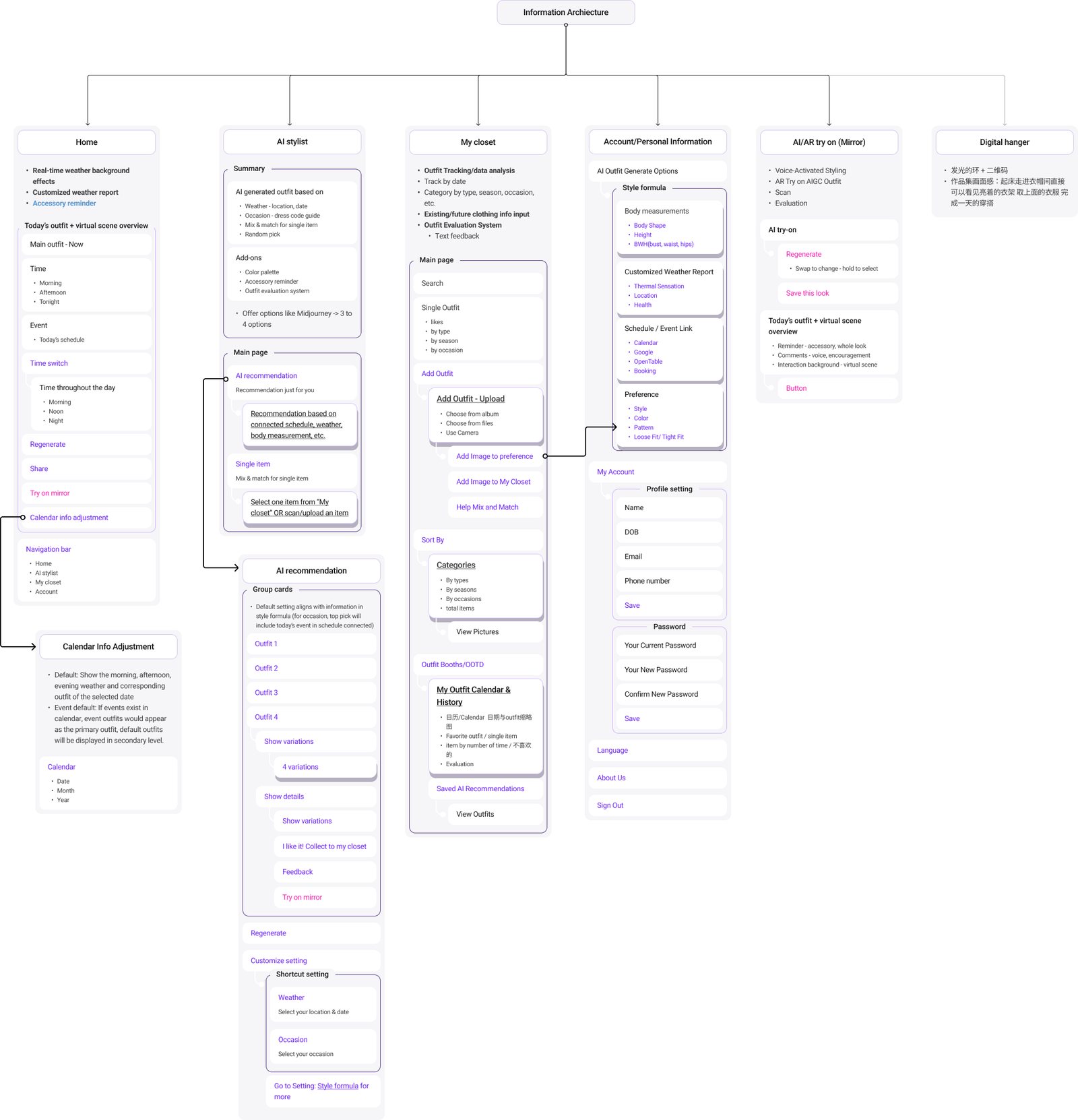
We grouped every opportunity from the journey map into four places in the app: Homepage, AI Stylist, Closet and Settings. Then we drew the information architecture so each feature had one clear home.
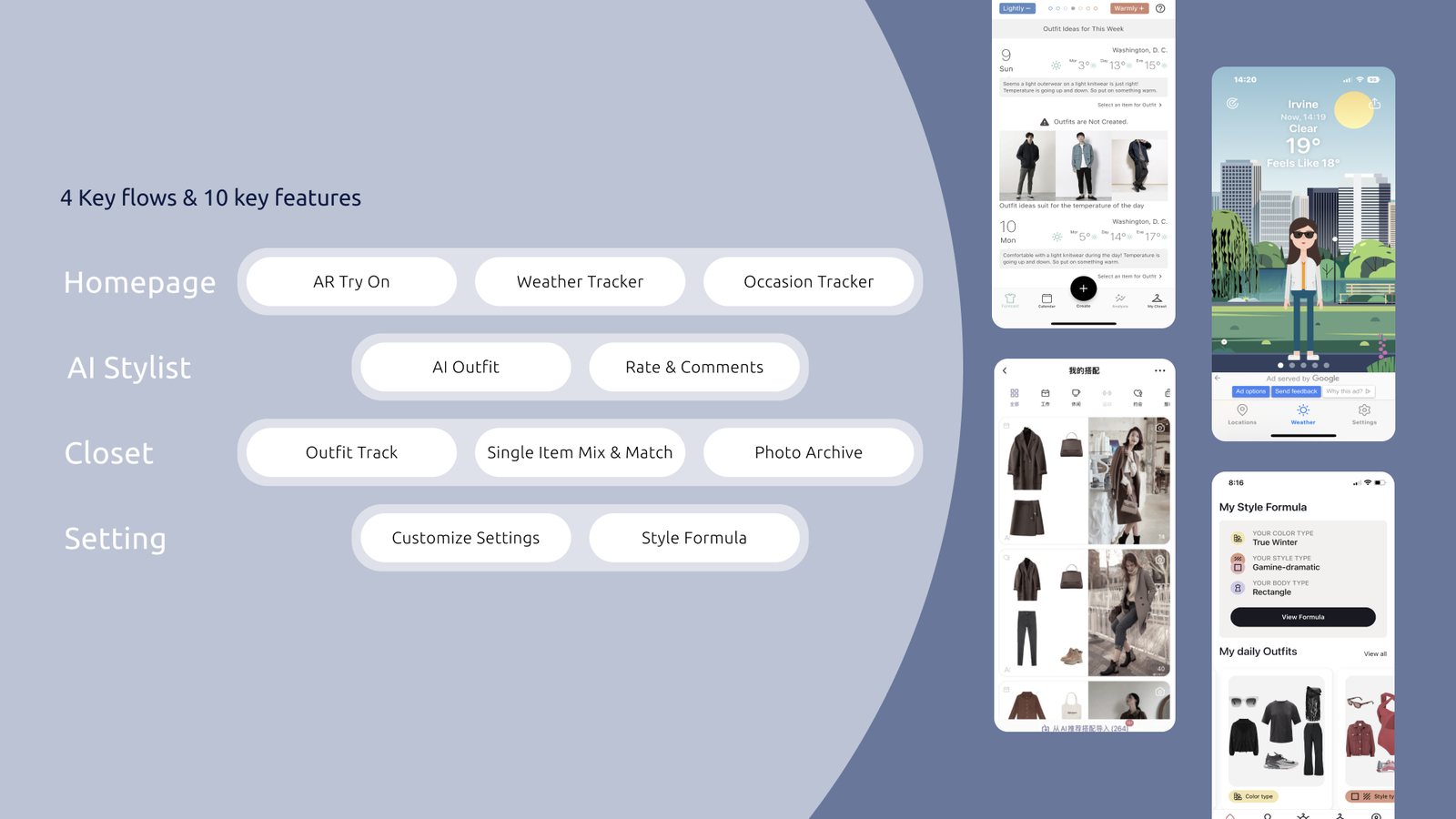
Features roadmap: Homepage with AR try on, weather tracker and occasion tracker; AI Stylist with AI outfit and rate and comments; Closet with outfit track, single item mix and match and photo archive; Setting with customize settings and style formula. Competitor screens on the right.
Features roadmap. 4 key flows and 10 key features.
Information architecture tree with six branches: Home, AI stylist, My closet, Account and personal information, AI try on mirror, and Digital hanger, each broken into pages and actions.
Information architecture. Home, AI Stylist, Closet, Account, Mirror, and a Digital Hanger idea we parked.
Wireframes

The AI Stylist flow, in grey boxes first.

The stylist flow had the most branches: know your style or skip, pick from four outfits, regenerate, try it on the mirror, rate it. We drew the decision tree before any pixels.
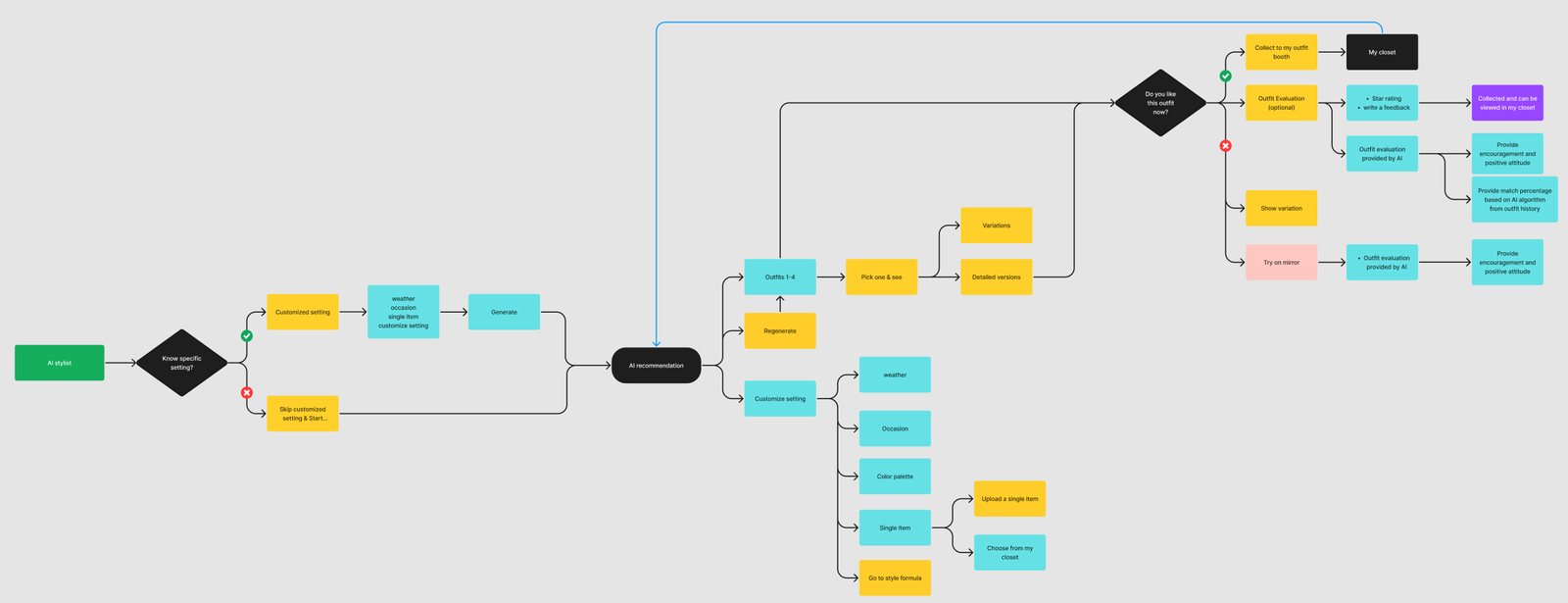
User flow diagram for the AI stylist: a decision on whether the user knows specific settings, customize settings, AI recommendation of outfits 1 to 4, pick one, regenerate, and a decision on whether the user likes the outfit, leading to save, rate or try on mirror.
AI Stylist user flow. Every path ends in save, rate or try on.
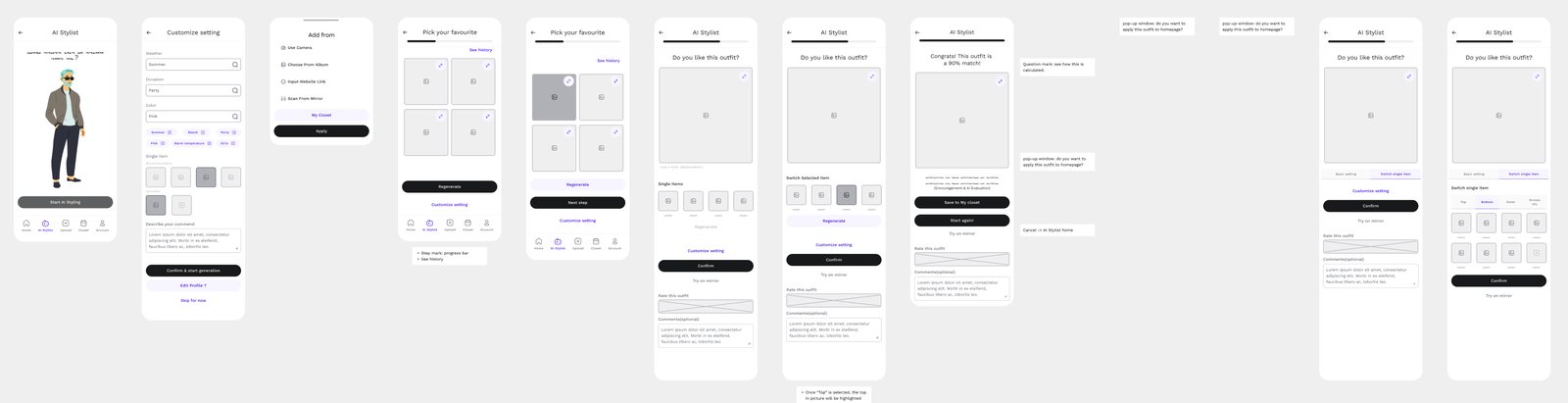
A row of low fidelity wireframes for the AI stylist: start screen, customize setting, add from, pick your favourite grid, outfit result with rating, and congratulations match screen.
Low fidelity. AI Stylist screens with notes on each pop up.
Pain Points to Solutions

Each flow answers specific pain points.

Every feature traces back to a pain point from the research.

HomepageTrying on outfit after outfit · wrong clothes for the weather
SolutionTry on mirror · weather tracker based on how you feel

See the look on you before you change, and get a forecast tuned to whether you run warm or cold.

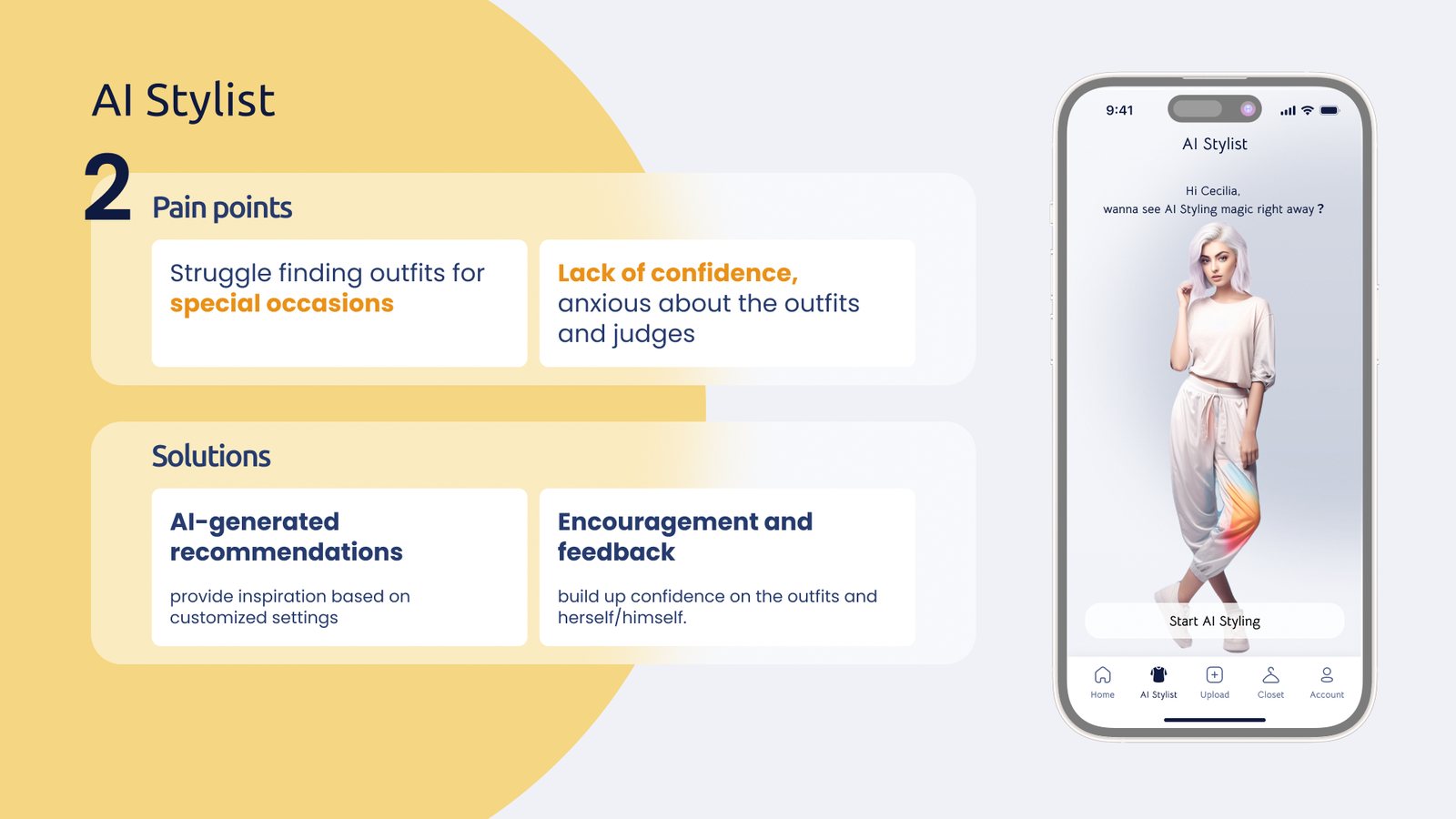
AI StylistSpecial occasions · not feeling confident
SolutionAI recommendations · encouragement and feedback

Ideas based on your settings, plus a rating and comments step that builds confidence over time.

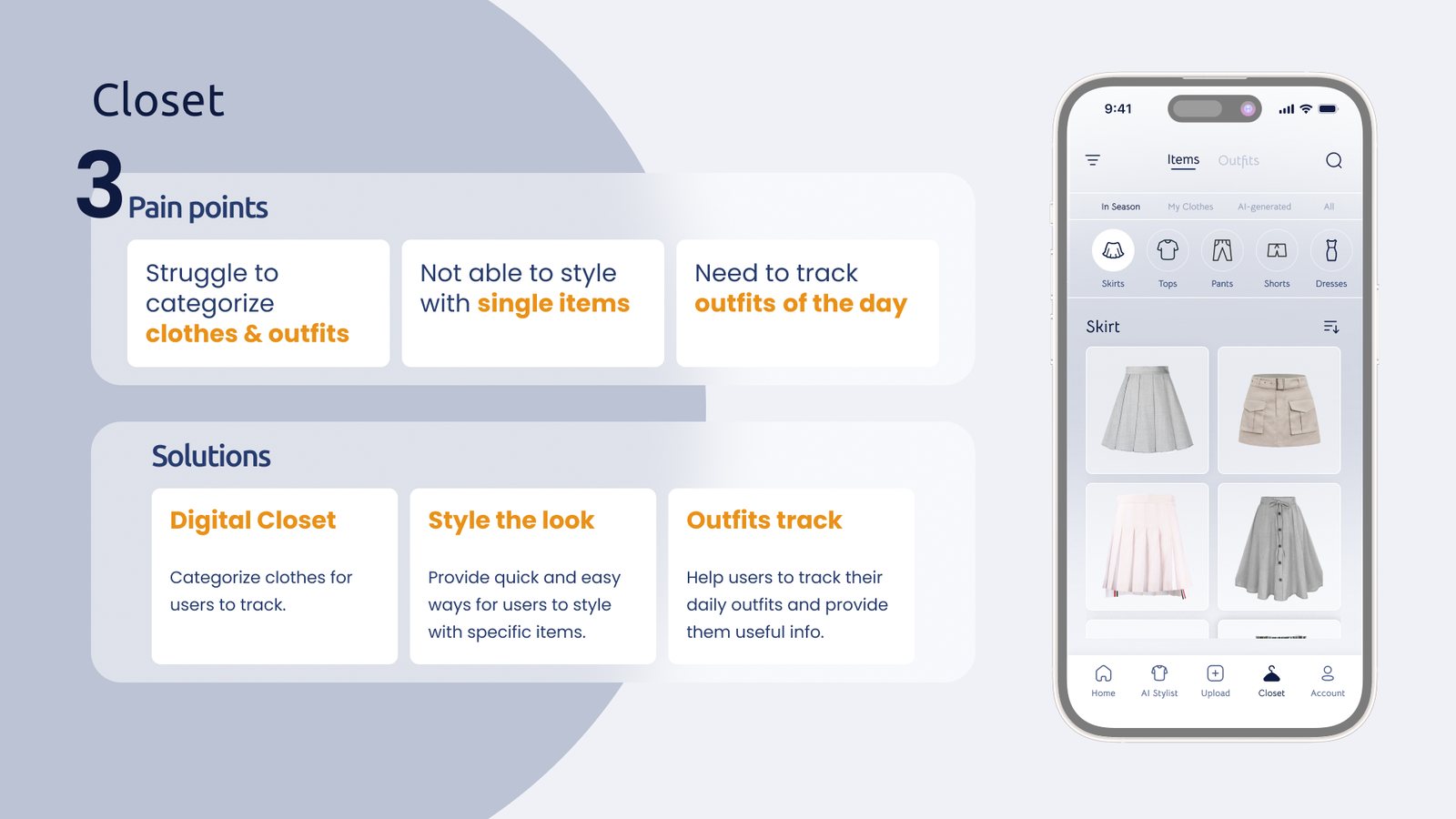
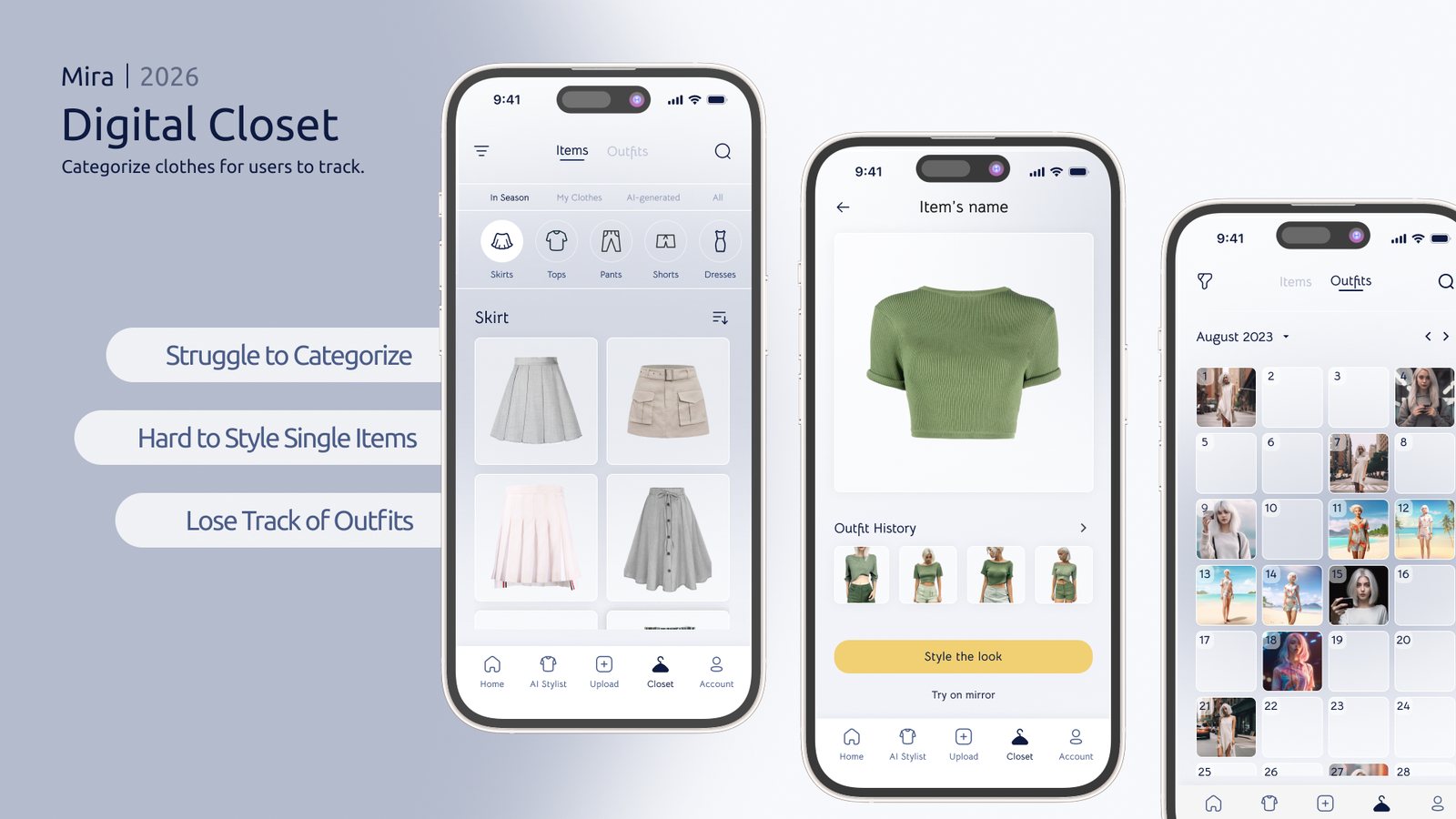
ClosetHard to categorize · hard to style one piece · losing track
SolutionDigital closet · style the look · outfit track

A closet sorted for you, outfits built around a single item, and a calendar of what you wore.
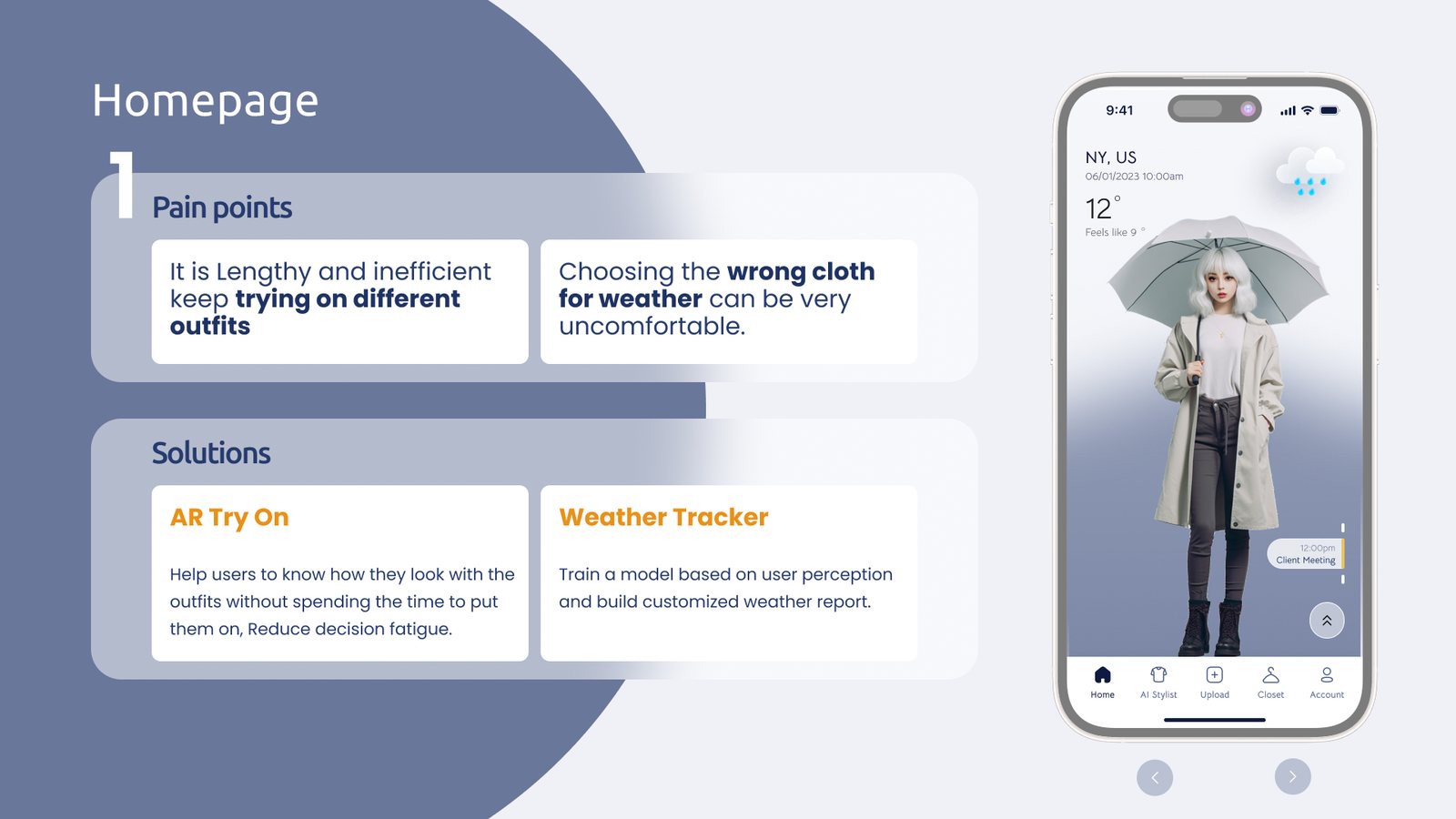
Homepage slide: pain points of trying on outfits and dressing wrong for the weather, solutions of AR try on and a weather tracker, beside a rainy New York home screen.
Flow 1, Homepage.
AI Stylist slide: pain points of special occasions and lack of confidence, solutions of AI generated recommendations and encouragement and feedback, beside the AI stylist start screen.
Flow 2, AI Stylist.
Closet slide: pain points of categorizing clothes, styling single items and tracking outfits, solutions of digital closet, style the look and outfits track, beside the closet screen.
Flow 3, Closet.
Iterations

Five versions before the home screen felt like a mirror.

The home screen carries the whole product: weather, schedule, the outfit and the actions. Each version fixed one thing the last one got wrong.

V0 · V1

Illustrated avatars

Easy to draw, but nobody pictures themselves as a cartoon. The day's timeline showed up in V1 and stayed.

V2

Realistic AI people

The outfit suddenly read as something you could wear. The schedule shrank to one event marker.

V3

The whole day as a list

Client meeting, party, movie night. Useful, but the panel covered most of the outfit.

Final

Change the look

Tap the one piece you don't like and swap only that. The yellow Regenerate button became the one bright thing on screen.
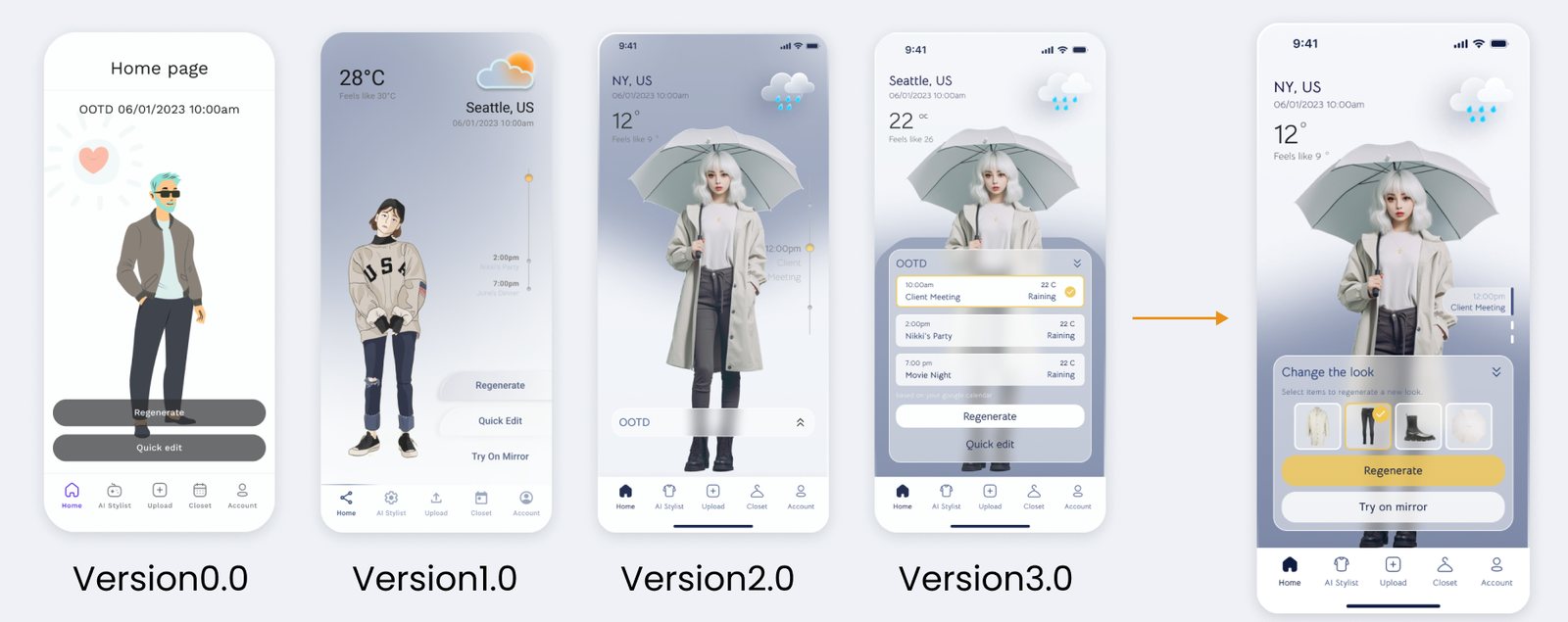
Five versions of the Mira home screen side by side, from a cartoon man with grey buttons to the final screen with a Change the look panel, a yellow Regenerate button and Try on mirror.
Version 0 to final. One screen from each round.
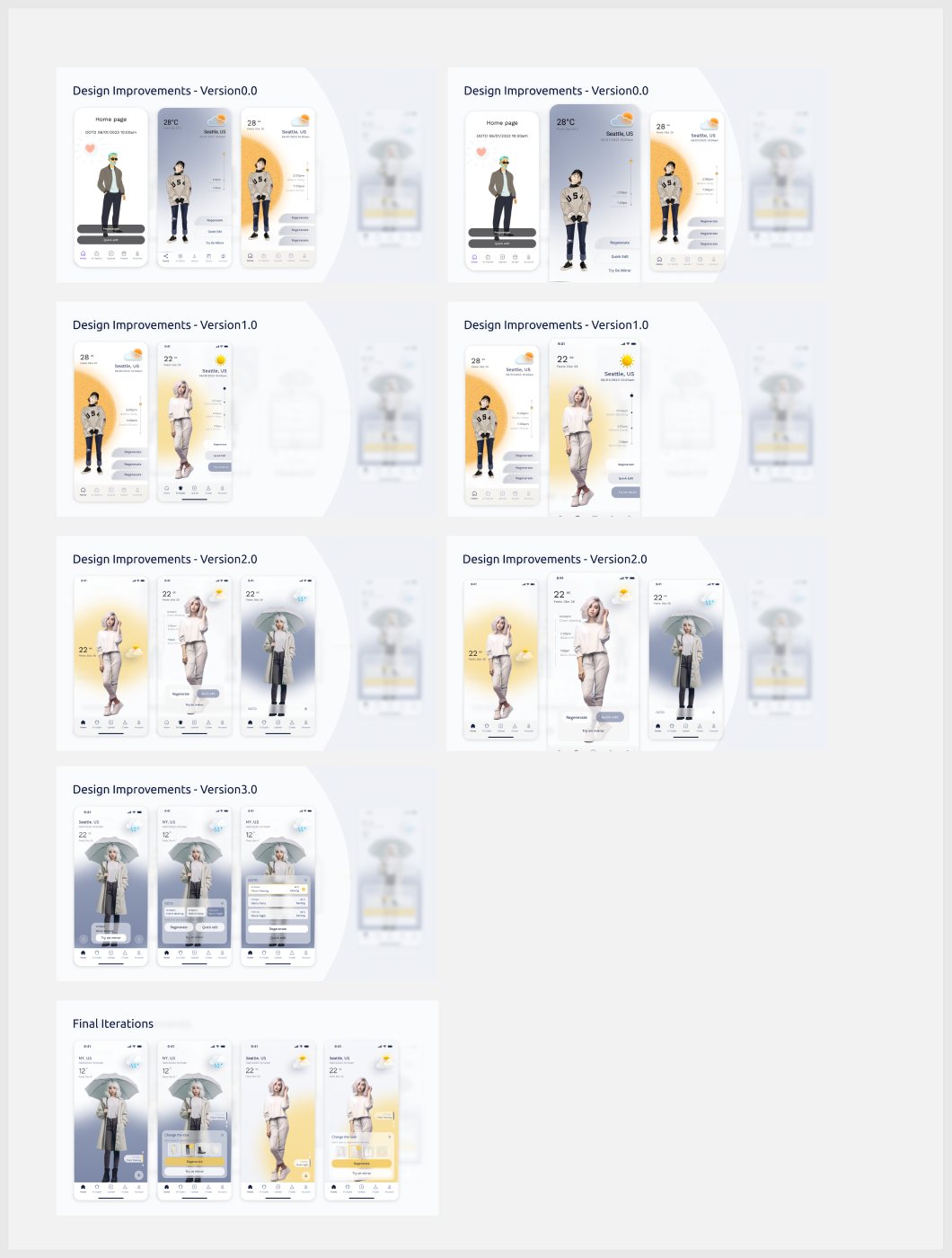
Every home screen explored, grouped by version 0, 1, 2 and 3 and final iterations, showing the move from illustrated characters with orange suns to AI generated people with soft yellow and grey gradients.
All the explorations. Each version had three or four variants.
What changed along the way
CharacterCartoon avatar
FinalOne consistent AI person
WeatherFlat orange sun
FinalSoft gradient that sets the mood
ActionsThree grey buttons
FinalOne yellow primary
ScheduleFull list on top of the look
FinalOne event tag on the side
High Fidelity Flows

Every flow, end to end.

The final prototype covers the full AI Stylist journey, the closet, and settings like body measurements, thermal sensation and style preferences.
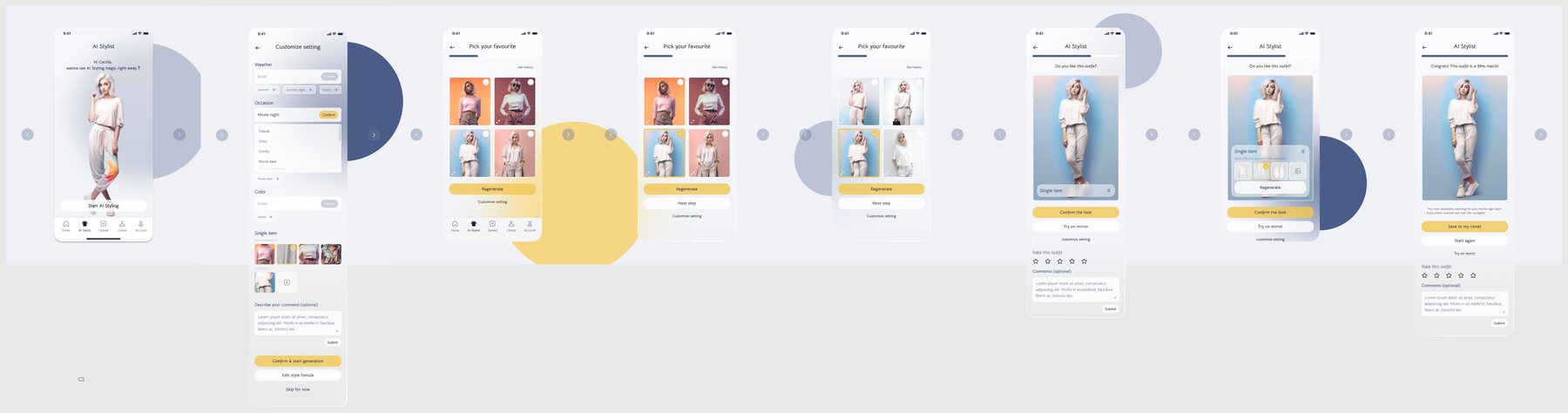

High fidelity AI stylist flow: start screen, customize setting, pick your favourite from four looks, select a look, outfit result with rating, and congratulations screen.
AI Stylist. Start, customize, pick your favorite, rate it, save it.
High fidelity closet flow: skirts and tops grids, a single item with outfit history, search, the outfit calendar, and an outfit detail with a street photo.
Closet. Items, single item, search, outfit calendar.
High fidelity settings flow: account home with style formula, body measurements with a 3D body, body shape adjustment, thermal sensation settings, schedule and event links, color and pattern preferences, profile, password and language.
Settings. Body, thermal sensation, schedule, preferences. This is the style formula that shapes every suggestion.
Final Design

Same person, different city, different day.

22°C in Seattle with a movie night gets a soft knit and joggers. 12°C and rain in New York before a client meeting gets a trench, dark denim and boots. One tap regenerates. Try on mirror carries the look to the mirror.
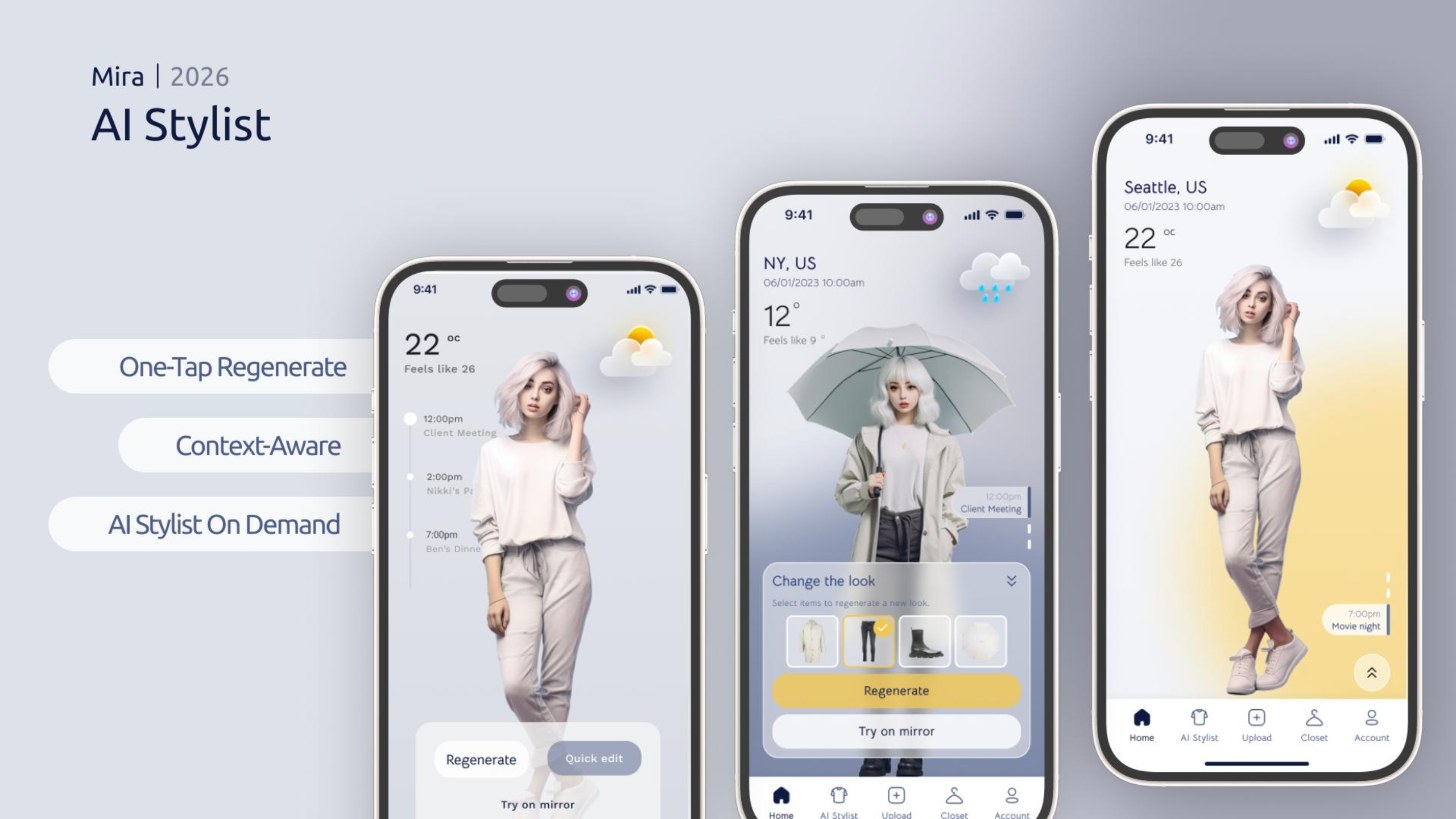
Three Mira home screens: one with the day's events, one in rainy New York with a trench coat and the Change the look panel, one in sunny Seattle with a movie night event.
AI Stylist. Weather, location and the next event all change the suggestion.
Three closet screens: a grid of skirts with category icons, a green top with its outfit history and a Style the look button, and a monthly outfit calendar filled with photos.
Digital Closet. Items, one item's history, and the outfit calendar.
A grid of final Mira screens: home with Change the look, AI stylist, pick your favourite, outfit result with rating, closet tops, item detail with AI mix and match, account with style formula, and body measurements.
Final screens.
2026 Revisit

Why this look? Trust needs a reason.

Three years later, AI stopped waiting to be asked. That made the old Mira feel incomplete. If an app tells you what to wear without saying why, it's hard to trust and harder to correct. So each suggestion now shows the weather, the event and the style preference behind it. Try it.

If you can see why the AI picked it, you can fix the part it got wrong.

Design principle for Mira 2.0
Seattle, US · Tue 10:00am
22°Feels like 20°
  • WeatherPartly cloudy, 22°C. Light layers.
  • CalendarClient meeting at noon. Polished but easy.
  • StyleYour formula: soft neutrals, relaxed fit.
RegenerateTry on mirror
Status

A low fidelity concept added for the 2026 version. Not tested with users yet.

From App to Ambient

One stylist across your phone, a widget and the mirror.

The app is for deep control: closet, preferences, body measurements. A widget shows today's look at a glance. The mirror shows the outfit on you before you put it on. Mira suggests, you decide.
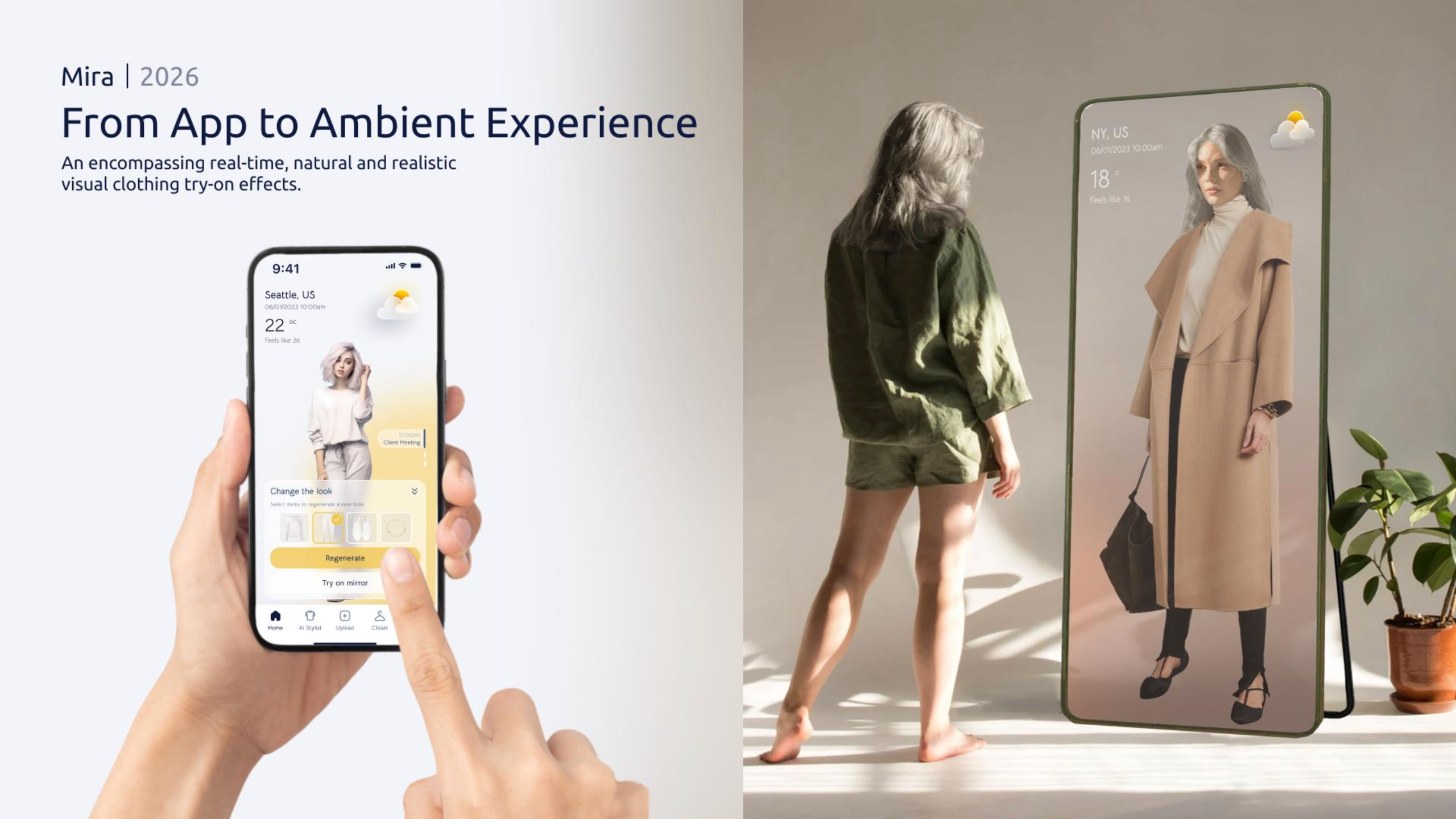
A hand holds a phone showing the Change the look panel next to a full length smart mirror where a woman sees herself in a camel coat, with the weather in the corner.
Try on mirror. Concept rendering. The mirror is not hardware we built.
Visual Language

Calm enough to use half awake.

People open Mira in the first ten minutes of their day. I kept the palette cool and soft, gave the product one warm color, and saved it for the actions that move you forward.

Midnight#101836

Type and icons. Softer than black.

Morning yellow#E6C66B

Only for Regenerate and Style the look.

Mist#A9B1CC

Rainy day gradients and panels.

Cloud#EEF1F8

Backgrounds and frosted cards.

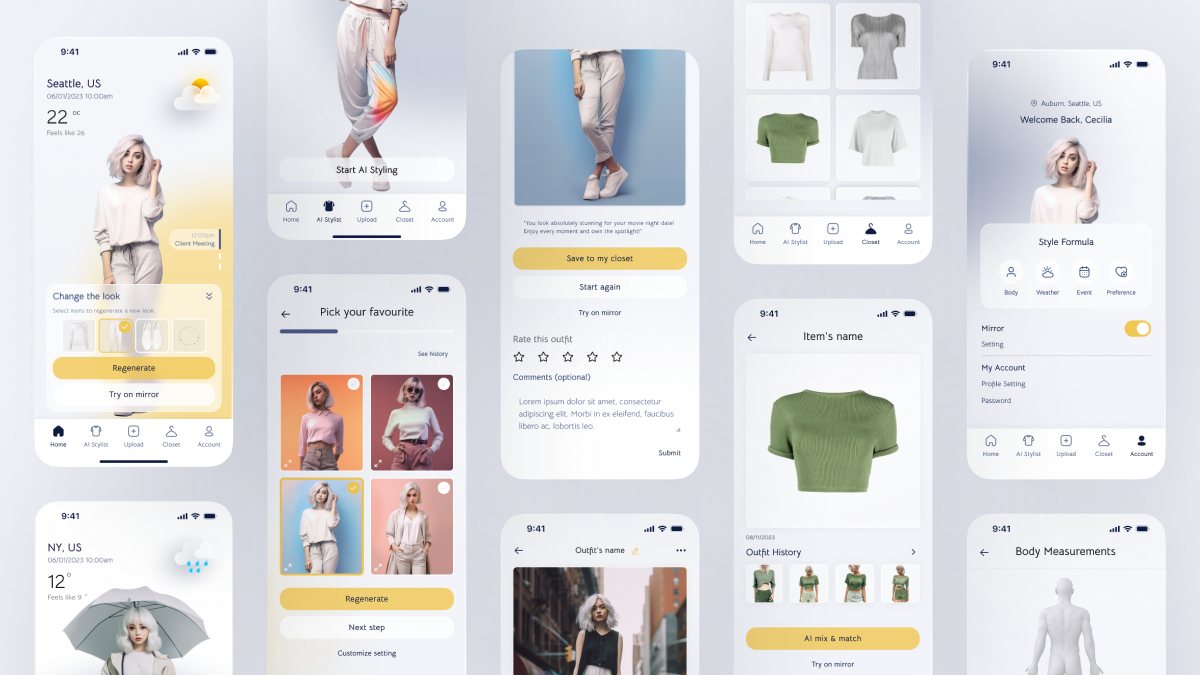
A spread of Mira screens: home, AI stylist welcome, outfit rating, closet tops, account settings with a mirror toggle, pick your favourite look, a rainy day home screen, an item detail, and body measurements with a 3D body model.
The full set. Frosted cards, soft gradients, one yellow action.
Impact

A student sprint that held up three years later.

Recognition

MUSE Silver 2026

Product Design: UX / UI / IxD, entered as Harvard University × University of Washington.

Testing

Cards over lists

In usability tests with 5 people, card and mood board layouts beat list layouts.

Growth

App to ambient

The 2026 revisit added reasoning and a multi surface concept on top of the original app.

Reflection

What I'd tell myself in 2023.

Polish can hide gaps

AI imagery made Mira look finished on day one. A beautiful screen gets fewer hard questions, and the hardest one, why should I trust this, waited three years for an answer.

Test the reasoning next

Why this look is still a concept. Next I'd put it in front of people and check whether reasons build trust or just make the screen busier.